

Key takeaways
- Production cost for an AI avatar video runs about $4; all-in cost including supervision and automated fixes is $9.83, with supervision and fixing alone accounting for 61% of total spend over seven days.
- n8n is only a webhook router and audit log; roughly 190 JavaScript and Python drivers stored in Postgres do the real work.
- One TTS job per voice section, transcribed back and diffed against the script, catches errors that per-sentence checks miss.
- The claim gate fires before any TTS spend, and the composition plan is built and dry-rendered before lip-sync GPU time is bought.
- In the last 10 takes, RunPod had zero available capacity across 114 attempts; Vast.ai carried all 19 successful rents. GPU supply is the single biggest wall-clock variable.
The honest answer on cost: a PushVid AI video costs about $4 in direct production spend and $9.83 once you count the supervision agents and automated repair jobs that keep it running without a human watching. The honest answer on what breaks: real-video intake, GPU availability, and too many processes writing to the same state keys. Everything else is solvable with gates and resumable state.
0:00 Intro
1:32 The Platform: Not What You Think
2:26 The Infrastructure Stack
3:16 PushPoint: the Narrated Slideshow Pipeline
4:55 The Embed Block and Page Publishing
6:21 Lip-Sync: LatentSync on the Take
7:23 The Spend Breaker and GPU Supervision
9:17 Approval and Publishing
9:55 What It Actually Costs
10:45 Weak Spots: What Doesn’t Work Well
11:23 Supervision: the Cost of Keeping It Running
12:42 The Module Map for a Rebuild
Full transcript
0:00 Intro
Before I say anything else, I want to be straight with you. The voice you’re hearing right now is not me recording in a studio. It’s my 11 -labs voice clone. The mouth movement you’re watching is AI -generated lip sync running on a recorded plate of me. This video is itself made by the system it describes. That’s not a disclaimer to rush past, it’s the whole point of what we built. A topic goes in. A published YouTube video with chapters, captions, a transcript, and a matching webpage comes out about $4 in production cost. Here’s exactly how it works. PushLeads runs three automated pipelines. Pushpoint, a fully automated narrated slideshow. 209 videos classified as slideshows so far. Marginal costs about $1 to $2 per 10 -minute video. Pushvid, a long -form talking head format built from a real recording of me, composed with deck panels, charts, and b -roll. Pushvid AI, internally called PushPro AI, same long -form format, but instead of a real recording, the voice is my 11 -labs clone, and the mouth is re -synced onto a pre -recorded plate of me. In the last seven days, Pushvid AI delivered 14 -14 production videos, 12 passed on first attempt, an 86% first pass rate, Q2 -finished file, roughly three hours, all in published costs, $9.83 per video, once you count supervision and automated fix -up, that number matters.
1:32 The Platform: Not What You Think
If you picture an N8N workflow with hundreds of nodes, stop. N8N is only the front door. It’s a webhook router with auth, rate limits, and an audit log. The real system is about 190 JavaScript and Python drivers. Stored is text and Postgres, a rebuild is a port of a codebase and a data model, not a Drivers are async, JavaScript functions stored as text, a caller loads one, evals it, calls it with a parameter object. Python helpers are stored the same way and written to disk before running. Every long pipeline is a resumable state machine. State is check pointed in one key per run. Each call works until a time budget runs out, saves and returns pending true with the current stage. A crash resumes from the last past gate. The orchestration host runs Linux with Docker and about 19 containers.
2:26 The Infrastructure Stack
It has eight cores and no GPU. That machine handles orchestration, slideshow builds, audio mastering, and delivery. Pushbeast is my Windows workstation with an RTX 3090. That card carries 24 gigabytes of VRAM. Pushbeast handles latent sync, 1.6 lip sync and mouth composite. It also runs self -hosted TTS and STT. I use that machine personally, so a policy key controls rendering. The key simply turns rendering on or off as needed. Rented GPUs come from vast .i RTX 5,090 pods. Vast handled all 19 successful rents without issue. External services include Anthropic’s Claude and 11 labs. The stack also uses YouTube data API version 3. That API runs across three Google Cloud projects.
3:16 PushPoint: the Narrated Slideshow Pipeline
The topic director runs on Sundays. It pulls search console queries, long queries over 55 characters as an AI search signal, AI overview citation records, a YouTube channel scan, and data for SEO search checks capped at $1 per run. The scoring formula, AI impressions times 2 plus AI keywords times 12. Buyer intent terms like cost, price, worth it, vs. near me, get a four times boost. Guards before any topic enters the queue. Pages with pending changes are excluded, pages that already have a video or skipped, fuzzy duplicate check on keyword jacquard above 0.8, home and contact pages never touched, and no new topics if the render runway is already over seven days. Then, Claude Sonnet expands the page or writes a new 3,000 to 5 ,000 word page with two AI images, FAQ schema, article schema, and a video slot marker. Sonnet writes a slide -cued voiceover and deck spec in one of 25 format variants. That matters because YouTube’s inauthentic content policy targets sameness, not volume. The rule here is critical, never synthesize the whole script and a line afterward. A single cut would desync every later slide. One narration segment per slide, period, every encode carries a square pixel flag, and the build fails unless the output is exactly 1920×1080 square pixels. LibreOffice output carries a slightly non -square pixel aspect that FFmpeg will honor silently.
4:55 The Embed Block and Page Publishing
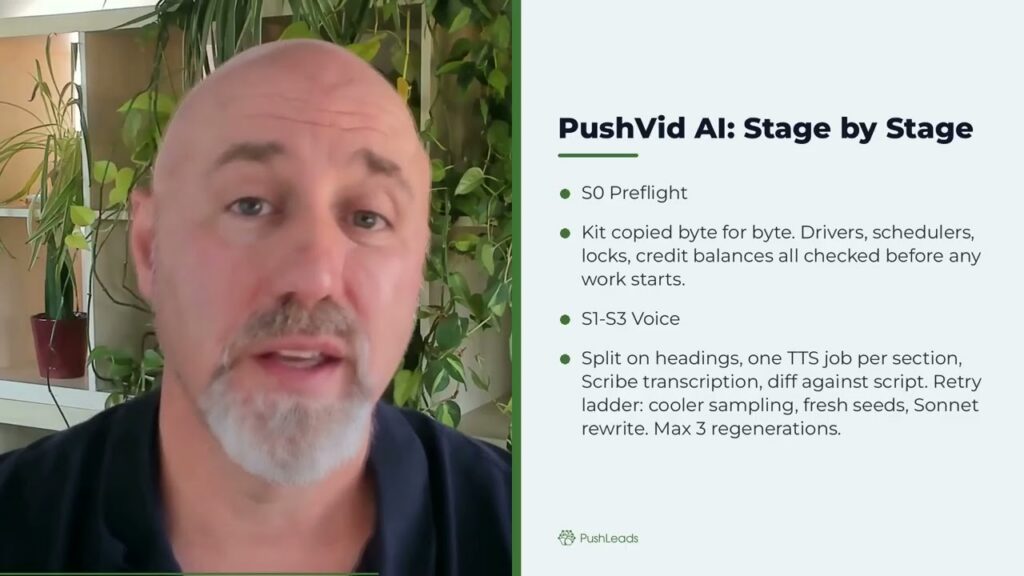
The embed block is a pure function, no network calls, no database calls, old video objects for the same video are removed before the new one is inserted. After upload the system reads back the live page and verifies the video ID is present. That verification is a hard gate, not a courtesy check. This is the pipeline that made this video. Stage zero, the kit is copied byte for byte before anything reads it. Pre -flight checks, drivers, schedulers, locks, credit balances, stage one, split the script on headings, section count must match sections, JSON exactly. Stage two, one TTS job per section, saved as it lands. Stage three, whole section transcription with 11 -lab scribe, the retry ladder, cooler sampling first, then fresh seeds, then one sonnet rewrite, maximum three regenerations, then escalate. The gate, no inserted or dropped run of two or more words, plus a static and noise floor check. Why per section rather than per sentence? Per sentence checks miss defects that land on sentence boundaries. The diff has to cover the full section. You get a full quality audio track and a 16 kilohertz mono drive track. Stage four B, build and dry render the composition plan before lip sync. Plan errors fail before GPU money is spent. That gate order matters.
6:21 Lip-Sync: LatentSync on the Take
The plate is one continuous recording of me, about 15 minutes, no cuts, no black frames, at 1080p 30, with eye contact correction done once in descript latent sync 1.6, the stage two 512 config, 20 inference steps, deep cache output at 25 fps, a 10 minute video is about 9 chunks. On the RTX 3090, a 72nd chunk takes roughly 22 minutes and peaks, near 21 to 24 GB of VRM. Voice models in lip sync can never share the card, a binding GPU lease enforces one model at a time. Failing hosts are destroyed and avoided, listing failures throw instead of returning an empty list. And here’s a lesson that costs real money, never default a failed remote list to empty before a safety decision. An API change once made a billing GPU pod look like nothing running, rent -hunting costs 10 to 20 minutes per take, wall time per take, roughly 57 minutes with three pods, up to five hours on the workstation alone.
7:23 The Spend Breaker and GPU Supervision
The spendbreaker runs every five minutes, each take is capped at $3 per take, the daily run limit is 12 per day, the daily spend ceiling is $10 the hourly ceiling is 8 per hour, pod minutes are capped at 120, provider balance floors also act as limits, a trip destroys pods and pauses the resumer, an orphan pod sweep also runs every five minutes, destroy calls have silently failed before, the breaker and the sweep together form the backstop, the composition plan is built in 152 windows, it draws from the deck, transcript and layout catalog that catalog contains 23 layouts in total, each FFmpeg chunk line is hashed and cashed and unchanged revision renders in roughly three minutes, a fresh 10 minute video takes about nine minutes of machine time, audio is mastered to negative 14 LUFS, no video publishes without passing all eight, one content gate, two were diff, the final audio transcribed and diffed against fail closed process attestation, required stages ran, every render node produced its chunks, split screen share is between 8 and 20%, b -roll is on topic judged by vision tags, no retake slivers in the output, five visual review, a vision model sampling frames for blank text, garbled numbers and frozen frames, six, restate gate checking for false start restatements, seven, pro vid QC plan quality, including face time share, eight frame verify every single frame decodes, run these gates before the expensive steps wherever possible, the claim gate runs before any TTS is bought, the plan gate runs before lip sync fail closed always. When every gate is green,
9:17 Approval and Publishing
AI videos publish automatically, maximum two per day, one key turns autopilot off, anything not green waits for a WhatsApp message, reply yes, approve or go, and it releases a change note becomes fixed settings and triggers a rerender under a new video ID, the publisher refuses to run without either an approval record or an autopilot pass, it refuses a second approval of the same ID, it never marks a video as published unless YouTube returned a video ID, every external right is idempotent behind a publish lock and verified by reading it back. That pattern applies everywhere uploads and beds schema injection,
9:55 What It Actually Costs
push point, a nine minute 24 second video measured at 9,022 characters, which is 4 ,511 11 labs credits costing about 74 cents in TTS at the pro plan rate, push vid AI production costs roughly $4, all in published cost over seven days $9.83 per video, that breaks down as GPU $18.98, supervision and fixing were 61% of the total cost, that number tells you where to invest in a rebuild, a supervision cap introduced on October 24 cuts the Mac share going forward, 11 labs pro at $99 per month give 600,000 credits, enough for roughly 130 10 minute turbo videos, real
10:45 Weak Spots: What Doesn’t Work Well
recording intake regression tests zero out of 10 in the last seven days, that is the least reliable part of the system, midward restarts are not cut by the current filler removal pass, FaceTime share varies run to run because the shop plan is not deterministic, GPU supply, run pod zero for 114, vast destroy calls have silently failed before the mouth composite has no automatic retry failed render chunks are relaunched by index, workstation availability varies daily, because I actually use that machine, resume every five minutes max the lm operator agent handles states with no rule,
11:23 Supervision: the Cost of Keeping It Running
capped at $3 per day, all in and 150 per run, an automated cloud fixer with shell access runs after three failed attempts, or 20 minutes stuck, a deterministic rule engine is planned to replace most of the LLM deciders, and LLM acting as operator or engineer does not belong in the product version. One narration segment per slide one TTS job per voice section, never synthesize a full script and align afterward, transcribed generated audio and diff per section, per sentence checks miss boundary defects, check file size and decode every frame, a 54 by mp4 is not a video, probe sample aspect ratio, codec, FPS and audio parameters before concatenation, mismatched segments are dropped without an error by FFmpeg, never default a failed remote list to empty before a safety decision, run gates before the expensive step, make them fail closed, every external right idempotent behind a published lock verified by reading it back, one owner per run, one writer per state key, budgets per take per run per day per hour, with self expiring overrides. Here are the modules any rebuild needs to cover, a durable workflow engine with
12:42 The Module Map for a Rebuild
resumable steps, retries by failure class, and timers, tenant and lane configuration, content services, topic scoring, page writer, kit writer, page matcher, media workers, deck render, TTS, slide show assembly, composition render, GPU job service with provider adapters, leases, qualification and budgets, a gate library as pure functions with recorded verdicts, publish adapters, YouTube, WordPress, LinkedIn, drive, approvals and notifications, cost ledger and measurement, admin UI, the path to a product from this system means replacing per client code forks with forms and connection wizards, replacing handwired tokens with OAuth flows and keeping hard spend limits checked before every paid step per video inputs, type, topic, fact source, length, CTA date, one time setup, brand kit, voice, presenter plate, approval mode, an LLM acting as operator costs real money and introduces unpredictability at scale, a rebuild should make the rules explicit and let the LLM handle only the edge cases it genuinely cannot avoid. That’s the system topic in published video out, no magic, just a lot of gates. If you want to see what this approach does for search visibility, get a free visibility teardown at SEO .PushLeads .com slash audit or call 828 -348 -7686
This video was made by the same pipeline described in this post. Jeremy’s ElevenLabs voice clone narrates it and LatentSync re-syncs the mouth onto a recorded plate of him. If you want to follow the architecture rather than the story, the full PushVid AI video pipeline architecture reference has every stage mapped out.
Why n8n ended up as only the front door
When people hear that PushLeads runs three video pipelines on a self-hosted stack, they assume n8n is doing the orchestration. It is not. n8n runs in queue mode with four workers and handles one thing: it is a webhook router with consumer API keys, per-consumer rate limits (60 to 600 requests per minute, depending on the lane), and an audit log of every inbound call. Routing logic is itself a hot-reloaded driver, not an n8n node.
The actual pipelines live in about 190 JavaScript and Python drivers stored as text in Postgres and executed by a Node.js sidecar. A Node sidecar (a small execution service that loads driver code, evals it, and calls it with a parameter object) runs those drivers with two injected helpers: $pg for SQL and $brain for key-value state. All run state, job tables, logs and costs also live in Postgres. If n8n disappeared tomorrow, rebuilding it would mean porting a code base and a data model, not translating a canvas of nodes. That distinction matters for anyone evaluating whether n8n is the right backbone for a serious automation.
The reason things ended up here is practical. Long pipelines need resumable state machines: each pipeline stage checkpoints its progress in one Postgres key per run, works until a 40-minute time budget runs out, saves, returns pending:true with the current stage, and waits for the scheduler to tick again. Every step is skip-if-done, so a crash resumes from the last passed gate rather than from the top. n8n does not give you that natively for multi-hour GPU jobs. The Node sidecar does.
One TTS job per section and per-section transcript diffs
PushPoint, the AI-narrated slideshow pipeline, established the core TTS rule: never synthesize the whole script and align afterwards. We measured this directly. A 9-minute-24-second slideshow used 9,022 characters, which at the ElevenLabs turbo rate on the Pro plan ($99 per 600,000 credits) cost $0.74 in TTS alone. Each slide gets its own ElevenLabs request, and each slide lasts exactly as long as its narration clip plus a pad. A single cut in a whole-script approach would desync every later slide with no clean recovery. Captions come from ElevenLabs character-level alignment grouped at sentence boundaries capped at 42 characters, so they cannot drift.
PushVid AI pushed the principle further. Voice stage S2 sends one TTS job per script section, saves each clip as it lands, and normalises the text for speech before sending (SEO becomes S-E-O). Stage S3 transcribes each section back using ElevenLabs Scribe with word timings, normalises in both cardinal and digit modes, then diffs against the original script. The retry ladder is: cooler sampling temperature, fresh seeds, then one Claude Sonnet rewrite; maximum three regenerations before escalation. The gate condition is strict: no inserted or dropped run of two or more consecutive words, plus a static check and a noise check. Per-sentence checks miss defects that land on sentence boundaries; the whole-section diff catches them.
Why gates run before the expensive step where possible
The claim gate, which blocks unapproved durations, prices, phone numbers, service claims and placeholders, runs before any TTS credit is spent. For PushVid AI, the composition plan is built and dry-rendered before lip-sync GPU time is purchased. Stage S4b exists solely for this: plan first, fail cheap.
Eight gates run before publish: content gate, WORD_DIFF (final audio transcribed and diffed against script), TITLE_BOUNDS, ATTEST (process attestation checking that required stages ran, every render node produced its chunks, split-screen share is between 8 and 20 percent, and b-roll is on topic), VISUAL_REVIEW (a vision model sampling frames for blank text, garbled numbers and frozen frames), RESTATE_GATE (false-start restatements), PROVID_QC (composition quality including face-time share), and FRAMEVERIFY (every frame decodes). Any failure holds the video for a human.
Two lessons reinforced this approach. First: a 54-byte MP4 is not a video, and a truncated MP4 still has a size. File size alone is not a decode check; FRAMEVERIFY exists because of this. Second: mismatched segment parameters are dropped by ffmpeg without an error. We now probe sample aspect ratio, codec, frame rate and audio parameters before concatenation. Every PushPoint encode carries setsar=1 and the build fails unless the output is exactly 1920×1080 square pixels, because LibreOffice PNG output carries a slightly non-square pixel aspect that ffmpeg honours silently.
The GPU supply reality
LatentSync 1.6 (the lip-sync model) runs at stage2_512, 20 inference steps, with DeepCache enabled, outputting 25 fps. Chunks are capped at 75 seconds because the model reads every frame into RAM. We measured about 6.2 MB per 1080p frame, so a 75-second chunk peaks near 11 GB. On our RTX 3090 workstation, a 70-second chunk takes roughly 22 minutes and peaks near 21 to 24 GB VRAM. A 10-minute video is about 9 chunks. Voice models and lip-sync can never share the card; a binding GPU lease enforces one model at a time.
Our data for the last 10 takes shows this clearly: RunPod returned no available capacity on all 114 attempts. Vast.ai made all 19 successful rents. That is not a knock on RunPod; RTX 5090 pods are in demand and supply moves fast. But anyone building a lip-sync pipeline needs a multi-provider strategy with automatic fallback, not a preference.
Pod acquisition is not instant. We rent, wait for the pod to reach running state, wait for sshd, then qualify by measuring real download speed and CUDA availability. Failing hosts are destroyed and added to an avoid list. Rent hunting costs 10 to 20 minutes per take. Wall time per take is roughly 57 minutes with three pods running in parallel; up to about 5 hours on the workstation alone. The Take Controller (running every 2 minutes) assigns chunks greedily across the workstation and available pods, dispatches detached, polls, and collects results. Policy: workstation plus three rented GPUs per 10 minutes of voice.
The spend breaker runs every 5 minutes and enforces: $3 per take, $12 per run per day, $10 per day, $8 per hour, 120 pod-minutes maximum, and provider balance floors. A trip destroys all pods and pauses the resumer. Overrides expire on their own. An orphan pod sweep runs on the same cadence. Vast.ai destroy calls have silently failed before; the breaker and the orphan sweep are the backstop, not a guarantee.
The $9.83 all-in vs ~$4 production and the supervision tax
Our data for the 7 days to October 26, 2026 (14 videos delivered): total spend $98.35, broken down as GPU $18.98, b-roll library $12.00, pipeline LLM calls $7.05, Max supervision agent $21.36, and Claude automated fixes $38.96. That is $9.83 per published video all-in. Direct production, covering GPU, TTS credits and pipeline LLM, runs about $4. Supervision and automated fixing were 61% of the total.
The automated Claude fixer (called after 3 failed attempts or 20 minutes stuck) handled 30 jobs over 8 days, spent $44.57, and fixed 20 of them, roughly $2.20 per successful fix. A supervision cap introduced October 24 limits the Max LLM operator agent to $3 per day all-in and $1.50 per run. That will pull the supervision share down in subsequent weeks.
For comparison: PushPoint (the slideshow pipeline) runs about $1 to $2 per 10-minute video, with TTS at $0.74 to $1.19 depending on length and a kit cost of $0.14 to $0.15. We measured 16 studio kits at $2.39 total. ElevenLabs Pro at $99/month gives 600,000 credits, covering roughly 130 ten-minute turbo videos. The capacity constraints are ElevenLabs credits for slideshows, YouTube quota (spread across 3 Google Cloud projects, about 14 uploads per day), and GPU time for PushVid AI.
These figures sit alongside our broader finding that YouTube video format matters for AI citation rates, which affects whether the production cost justifies the investment at all.
Too many controllers and the one-manager plan
The system’s own audit on October 24, 2026 counted approximately 22 video tickers (scheduled processes checking video state), 7 writers to the AI run-state keys, 7 writers to composition keys, and 3 separate path deciders. The lesson from that audit: one orchestrator per run, watchers that only report.
The plan is one manager that decides, one writer per state key, and roughly 6 tickers. Today the resumer runs every 5 minutes, the take controller every 2 minutes, autodrive every minute, watchdog every 5 minutes, hourly reconcile, post-approve every 3 minutes, spend breaker and orphan sweep every 5 minutes. Each of those is reasonable individually; together they create contention on the same state keys. The rule-based manager is now running read-only in shadow mode, planned to replace most of the decider logic without LLM calls.
The Max agent (an LLM operator called for states where no rule exists) is capped because open-ended LLM orchestration is expensive and unpredictable at volume. The better architecture is: rules handle the common path, LLM handles genuinely novel states, automated fixer handles known error patterns. The goal is to push the LLM further from the hot path, not deeper into it. This connects to a broader point written about regarding content publishing automation workflows: the automation should reduce operator load, not transfer it to an AI agent that still needs watching.
What an app version must do without an operator
PushVid AI publishes without human approval when every gate passes, up to 2 videos per day. One key turns autopilot off. Anything that does not pass every gate, and every real recording, waits for a WhatsApp message: reply yes/approve/go releases it, a change note triggers a re-render under a new video ID. Publishing refuses without an approval record or an autopilot pass and refuses a second approval of the same ID.
Today, setup and repair still run through Claude: per-client renderers are code forks, brand facts are hand-written, voices and tokens are hand-wired. In seven days to October 26, we made 128 driver edits across 52 drivers, with 3.1 touches per delivered kit against a target of under 3. A real app, one that runs without an operator present, turns each of those manual steps into a form, a connection or a fixed rule. LLM calls inside the pipeline stay; an LLM acting as engineer or operator does not.
What a product version must handle on its own: bounded retries by failure class, then a “needs attention” state with a one-click action; hard spend limits checked before any paid step; a GPU provider pool with automatic fallback or a hosted lip-sync API as an alternative; a reference-video regression test in CI before each release; versioned deploys with no live code edits during production runs. We edited 52 drivers in one active week. That is fine when you are the engineer; it is a liability when clients are running their own lanes.
The real-video intake regression test passed 0 of 10 times in the last 7 days. That failure rate is what “still needs a human” looks like in practice. You do not need a human because the task is hard; you need one because the automated path is not yet reliable enough to trust alone.
For anyone thinking about what signals a reliable pipeline should produce, the measurement framework described in tracking AI search visibility monthly applies here too: pre/post windows, citation checks, and a consistent measurement cadence tell you whether the cost per video is justified by the outcome.
If you’re building one
- Put your logic in a language you control, stored where you can query it. Use your workflow tool as a router, not as the orchestrator.
- Make every pipeline a resumable state machine with one state key per run. Skip-if-done at every step. A crash should cost you minutes, not a re-run from scratch.
- One TTS job per section. Transcribe it back. Diff the whole section against the script. Per-sentence checks miss boundary errors.
- Run gates before the expensive step where possible. The claim gate fires before TTS. The composition plan runs before GPU spend. Fail cheap, fail fast.
- Never default a failed remote list to an empty list before a safety decision. An API change once made a billing GPU pod look like nothing was running. That is how orphan costs happen.
- Verify every external write by reading it back. Idempotent behind a publish lock. Two writes to the same YouTube video ID is not a theoretical problem.
- Probe codec, frame rate, sample aspect ratio and audio parameters before concatenating segments. ffmpeg drops mismatched segments without an error.
- Decode every frame of every output file. File size is not a decode check.
- Plan for one GPU provider being unavailable. Our data from the last 10 takes showed 0 of 114 on one provider and 19 of 19 on another.
- One manager per run, one writer per state key. Count your tickers. If you have 22, you have a contention problem waiting to surface.
- Supervision will cost more than you expect. Budget for it explicitly. At 61% of all-in spend, it is not a rounding error.
- If you want the system to run without you, build the failure path first. “Needs attention” with a one-click action beats a Slack message that requires you to SSH in.
The PushLeads guide to the PushVid AI pipeline has more on the individual stages. The architecture decisions here also reflect what we have learned about auto-publishing to WordPress at scale: the embed verification, VideoObject schema, and chapter injection all follow the same idempotent-write-then-verify pattern described above.
If you are thinking about why this investment makes sense from an SEO angle, the short version is that YouTube mentions now predict AI visibility in ways that backlinks do not, which is a separate argument, but it is the one that made the cost worth calculating carefully in the first place.
Questions people ask
Does the pipeline need a human to approve every video before it goes live?
No, for PushVid AI. When all eight gates pass, the system publishes automatically, up to two videos per day. Real recordings and any gate failure wait for a WhatsApp approval message. The publishing step refuses to run without either an approval record or a confirmed autopilot pass.
Why not just use a hosted lip-sync API instead of renting GPUs?
We tested HeyGen as an optional path. At roughly $1.10 to $1.70 per finished minute in tests, it is a viable alternative for lower volumes. The hosted path is the right answer for a product without an operator; the rented GPU path is the right answer when you have the engineering to manage chunk sizing, retry logic and quality gates yourself.
What happens when the spend breaker trips?
All active GPU pods are destroyed and the resumer is paused. The breaker checks five limits every five minutes: $3 per take, $12 per run per day, $10 per day, $8 per hour, and 120 pod-minutes. Override raises expire on their own schedule so a manual override cannot accidentally run forever. The orphan sweep runs on the same cadence as a backstop.
How does the system handle a TTS section that keeps failing the diff gate?
The retry ladder runs in order: cooler sampling temperature, fresh random seeds, then a Claude Sonnet rewrite of that section only. After three regenerations without passing, the run escalates to a human rather than continuing. The gate condition, no inserted or dropped run of two or more consecutive words, does not bend on the third try.
Can the same engine serve client videos?
Yes. The same drivers run per-client lanes from a single config: each lane has its own ElevenLabs voice, YouTube token, privacy default, approver contact, publish days and weekly video cap. The kit uses the client’s own live page as the only fact source, read via web_fetch. A claim gate blocks unapproved durations, prices, phone numbers and placeholders before any TTS is purchased. Client setup today still requires manual steps; a product version turns those into forms and connections.
Sources
- PushVid AI Video Pipeline Architecture, Incredible Roots
- PushVid AI Video Pipeline, PushLeads
- Why YouTube Mentions Now Predict AI Visibility Better Than Backlinks, Incredible Roots
- We Undercounted Our AI Video Citations: A Follow-Up on Slideshows, AI Avatars and Real Presenters, Incredible Roots
- How to Measure AI Search Visibility for a Small Business, Incredible Roots
- Content Publishing Automation Workflows for Agencies, Incredible Roots
- Auto Publish to WordPress SEO, Incredible Roots